Public and Private Endpoints — Complete Guide
Welcome to a Modern AI Model Service! We have curated an extensive catalog of solutions featuring the most sought-after Large Language Models (LLMs). These are essential for a wide variety of text generation and analysis tasks, including creating marketing materials, drafting legal documents, formulating business strategies, and writing code in various programming languages.
Our catalog also includes models for generating images, video, and audio. Here, you will find models of varying scales and specializations: versatile assistants alongside specialized tools optimized for specific tasks.
To help you evaluate and select the best fit for your needs, you can launch inference directly within the platform interface. Test models on your own data, compare the results, and choose the optimal solution—all without the hassle of complex infrastructure setup.
We are dedicated to making AI technology accessible to everyone, whether you are a developer, researcher, or business professional. In this guide, we will provide a detailed walkthrough on how to launch both public and private endpoints.
Public and Private Endpoints — Complete Guide
Welcome to a Modern AI Model Service! We have curated an extensive catalog of solutions featuring the most sought-after Large Language Models (LLMs). These are essential for a wide variety of text generation and analysis tasks, including creating marketing materials, drafting legal documents, formulating business strategies, and writing code in various programming languages.
Our catalog also includes models for generating images, video, and audio. Here, you will find models of varying scales and specializations: versatile assistants alongside specialized tools optimized for specific tasks.
To help you evaluate and select the best fit for your needs, you can launch inference directly within the platform interface. Test models on your own data, compare the results, and choose the optimal solution—all without the hassle of complex infrastructure setup.
We are dedicated to making AI technology accessible to everyone, whether you are a developer, researcher, or business professional. In this guide, we will provide a detailed walkthrough on how to launch both public and private endpoints.
How the Model Catalog Works: Overview of Capabilities
The catalog page provides users with a structured list of available models. Each entry in the list includes:
- A brief description of the model, outlining its core capabilities and typical use cases;
- A set of tags reflecting key characteristics (task type, modality, specialization), including a special Try it tag (indicating that the model can be tested for free via public endpoints).
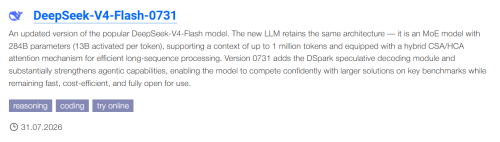
To work with the list, a search box is available to filter models by name, along with sorting options that let you organize results by various criteria (parameter count, context length, publication date, or availability for testing via public endpoints).
This catalog structure ensures quick and accurate model selection tailored to the requirements of any specific project.
From the catalog, you can navigate to a model's detail page with a URL like https://immers.cloud/ai/<provider>/<model-name>/ (for example, https://en.immers.cloud/ai/google/gemma-4-26b-a4b-it/). This page allows you to work with the suite of services within the immers.cloud platform:
- Public Endpoints Service;
- Recommended Server Configuration Selector;
- Private Endpoints Service.
Selecting the right model for a specific task can be challenging — different requirements, resources, and capabilities call for different approaches. That's why the platform lets you both try inference for free via the Public Endpoints Service and meet individual functional requirements through private servers or endpoints.
Public Endpoints Service
Public endpoints are available to all authorized users. We monitor the release of new open-source AI models and provide access to them promptly.
To quickly try out a model, simply open the chat interface—on the model page, click the Chat link under the Public Endpoint section.
To try a model within your own workflow or during software development, you can use the API. Request examples are provided on the model page. Access requires an access token, which you can create by visiting the token management page.
By using this public service, you confirm that you have fully reviewed the Terms of Use for the Public Endpoints Service and accept them in their entirety, without any reservations or exceptions.
Recommended Server Configuration Selector Service
Serious applications require stable access to specific functionality with a guaranteed quality level. If the Public Endpoints Service doesn't fully meet your needs, you can use our recommendations to set up a private server, where you can organize workflows exactly as required. Servers are available for hosting with hourly billing or long-term monthly subscriptions.
See the FAQ for details.
Selecting the right server configuration is a complex task that requires deep domain expertise. It should be based on the model's characteristics (architecture, parameter count, etc.), inference requirements (context length, parallelism, etc.), and server configuration specs. We offer a wide range of configurations, including GPU-powered options, which form the foundation for large neural network inference. To simplify your choice, we prepare verified recommendations for each model.
In recent years, a clear trend has emerged: the more parameters an AI model has, the higher its quality. However, large models require expensive servers with powerful GPUs, which places significant pressure on budgets. To optimize costs, quantization is used. reducing the precision of model weights and activations from the standard 32-bit format (FP32) to smaller formats. The most common options are:
- 4-bit (maximum resource savings, possible quality trade-offs);
- 8-bit (optimal balance between model size and quality);
- 16-bit (minimal precision reduction, virtually no quality loss).
Thus, quantization helps reduce infrastructure costs and enables the use of powerful AI models even with a limited budget. That's why we prepare recommendations for each bitness level.
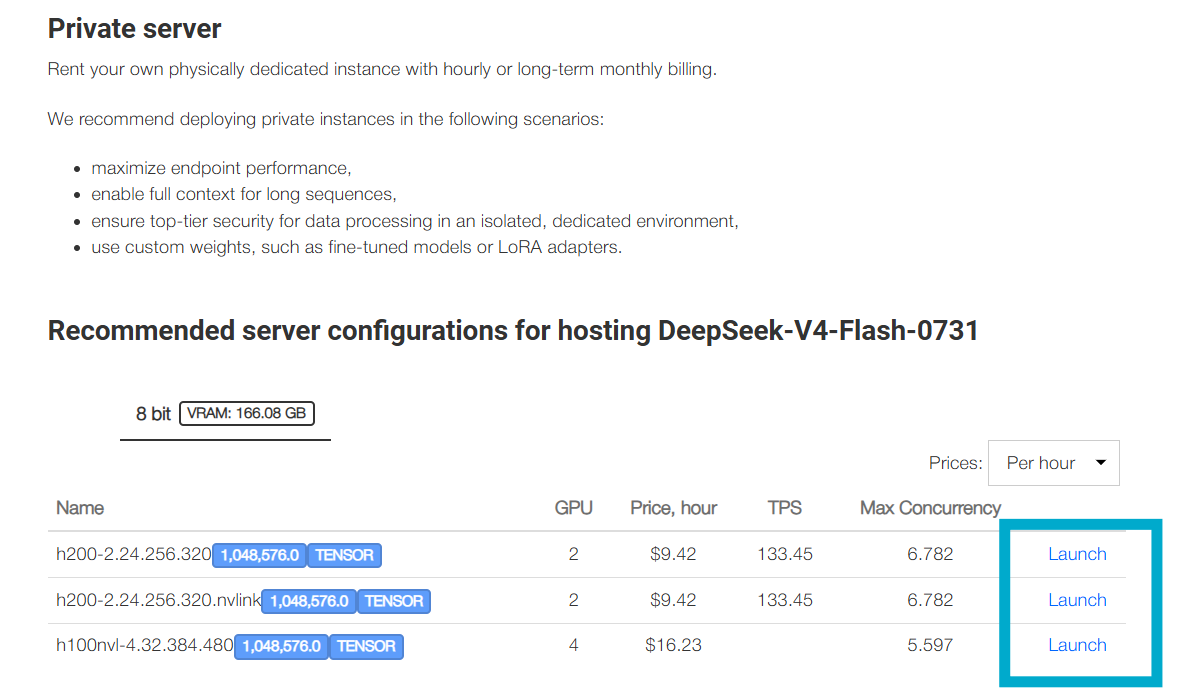
To use these recommendations, simply go to the model page and scroll down to the section Recommended server configurations for hosting. Depending on the model type, two usage options are available:
- If the model is an LLM or visual LLM, clicking the Launch button will open the private endpoint creation page. (More details about the Private Endpoints Service are provided below.) If you prefer to deploy the model using your own tools, you can create a server with your chosen configuration using the platform's core server hosting functionality.
- For other models (image, video, or audio generation), clicking Launch will create a regular server.
Due to high demand, not all configurations are available at all times. You can click the bell icon to subscribe to availability notifications. As soon as the specified number of configurations becomes available for hosting again, you will receive a notification.
Private Endpoints Service
Modern inference workloads come with strict requirements: high reliability, support for batch processing, efficient VRAM utilization, and a convenient API —preferably in OpenAI API format to simplify integration. vLLM meets all these criteria perfectly: it delivers stable performance, implements continuous batch processing, optimizes VRAM consumption, and provides a developer-friendly interface. That's why we chose this engine as the backend for our service — it ensures quality and ease of use at every stage.
The philosophy behind our service is to empower you to test various inference deployment options and find the optimal combination of configuration and parameters for your specific tasks. That's why we designed the service as a convenient playground for running vLLM — so you can easily experiment and select the best settings for your needs.
Creating a Private Endpoint
Creating private endpoints is available to authorized users. To create one:
- Navigate from the catalog to the page of the model you're interested in. The catalog page includes a search function to filter models by name.
- Scroll down to the section Recommended server configurations for hosting. The table lists configurations on which inference of the selected model quantization level is expected to run successfully using vLLM. It also specifies:
- The number of GPUs in the configuration;
- The hosting price for the configuration;
- Estimated inference statistics: TPS ("tokens per second," i.e., the number of tokens the model generates per second) and parallelism (the maximum number of concurrent full-context requests the endpoint can handle).
- Click the Launch button in the row of your chosen configuration.
- On the endpoint creation form that opens, specify all required settings, and adjust advanced options if needed.
Required Settings
|
Setting |
Description |
|---|---|
|
Weights |
Selection from models added to the catalog via Hugging Face. Due to demand for more cost-effective inference, manufacturers release models not only in the original data type used during training, but also in quantized variants. The selection may also include quantized weights from other providers. |
|
Context |
Context length is the maximum amount of textual information (in tokens) that a large language model (LLM) can consider when generating a response. By default, the maximum value supported by the model is pre-filled. During response generation, VRAM is consumed for intermediate computations, the volume of which depends on the specified context length. Thus, with a shorter context, you can run the model on a more affordable configuration with less total VRAM.
Note: The actual effective context length may differ from the stated value due to overhead from prompts, system messages, and infrastructure constraints. Always test the model on real-world data before deployment. |
|
Network |
The platform supports deploying endpoints in both public and private networks. For quick setup without complex configuration, creating an endpoint in a public network is the optimal choice. Simply select a provider from the list, and your endpoint will be ready to use. When handling corporate documents, data security is critical: leaks or unauthorized access can lead to serious consequences. A private network allows you to independently configure access levels, control, and data protection in line with your company's internal policies. To restrict resource access, it is advisable to deploy the endpoint within a private network: this ensures service isolation and reduces exposure to external threats. |
|
Configuration |
Selecting the right configuration is critical when creating an endpoint (see Recommended Server Configuration Selector Service for details). Please note: changing the context length or weights will update the list of recommended configurations. When choosing a configuration, we recommend paying attention to validated options, marked with colored circles:
|
|
Number of Instances |
Request volume to an endpoint varies: from moderate in small projects to intensive in production environments. An endpoint can handle any load: under the hood, it can combine multiple servers, evenly distributing requests across them via our load balancer. You can scale your endpoint by specifying the desired number of servers for inference deployment—this ensures stable performance under any load. |
|
Key Pair |
A key pair is required to connect to the server. Create one automatically (select Create new Key Pair) or use your own public key for enhanced security. |
Advanced (Optional) Settings
|
Setting |
Description |
|---|---|
|
Log Level |
Logging verbosity level. Available values: |
|
vLLM Version |
The vLLM project is under active development — updates with support for newly released open-source models are published frequently. As an open-source project with a large scope of work, not all versions are equally stable, and for certain models it may be necessary to specify a particular Docker image version. |
|
gpu_memory_utilization |
In the vLLM framework, the
If OOM errors occur, we recommend reducing |
|
max_num_batched_tokens |
The Tuning this parameter allows you to optimize model performance for specific requirements: reducing latency, increasing throughput, or balancing memory consumption. |
|
|
The vLLM uses Continuous Batching: new requests are added to processing as soon as resources are freed after earlier requests complete. This enables high GPU utilization. |
|
Tooling |
In vLLM, tooling refers to support for tool calling, a feature that allows the language model to invoke external tools or functions to perform tasks beyond its core capabilities. This is especially useful for scenarios where the model needs assistance solving complex tasks requiring access to external resources or execution of specific actions. |
|
Tooling Parser |
This parameter lets you select a parser for handling tool-calling requests. |
Click the Create button. After clicking, the endpoint page will open, displaying all its characteristics.
The endpoint creation process takes a certain amount of time — from 10 minutes to 1 hour. During deployment:
- Servers will be provisioned according to the specified number of instances. You can view the list in the My Cloud section;
- Network parameters and security groups will be configured;
- On each server, an inference execution environment will be deployed, and vLLM will be launched, which will automatically download the necessary model files.
If creation fails with errors, the endpoint status will be set to Unavailable. For more details, see the Troubleshooting section.
Verifying Private Endpoint Functionality
For a quick check, you can use the chat interface. To do this, click the Chat link next to the Status field.
vLLM provides an OpenAI-compatible API. This is highly convenient, as it allows you to integrate the framework into existing solutions without modifying client code — simply redirect your requests to the new endpoint and provide your access token. You can create a token on the token management page.
To verify that your newly created endpoint is working correctly, use the following request examples:
cURL
curl <endpoint URL>/chat/completions \

  -H "Content-Type: application/json" \

  -H "Authorization: Bearer <your access token>" \

  -d '{

    "model": "<model name from the endpoint page>",

    "messages": [

      {"role": "system", "content": "You are a helpful assistant."},

      {"role": "user", "content": "Say this is a test"}

    ],

    "temperature": 0,

    "max_tokens": 150

  }'
PowerShell
$response = Invoke-WebRequest -Uri "<endpoint URL from the endpoint page>/chat/completions" `

    -Method POST `

    -Headers @{

        "Authorization" = "Bearer <your access token>"

        "Content-Type"  = "application/json"

    } `

    -Body (@{

        model    = "<model name from the endpoint page>"

        messages = @(

            @{ role = "system"; content = "You are a helpful assistant." }

            @{ role = "user";   content = "Say this is a test" }

        )

    } | ConvertTo-Json)

($response.Content | ConvertFrom-Json).choices[0].message.content
Python
from openai import OpenAI

client = OpenAI(

    api_key="<your access token>",

    base_url="<endpoint URL from the endpoint page>",

)

chat_response = client.chat.completions.create(

    model="<model name from the endpoint page>",

    messages=[

        {"role": "system", "content": "You are a helpful assistant."},

        {"role": "user", "content": "Say this is a test"},

    ]

)

print(chat_response.choices[0].message.content)
Troubleshooting
Our platform is built on the philosophy of providing a playground for running vLLM. We ensure high flexibility in endpoint configuration: you can adapt parameters to meet the specific requirements of your task. However, it's important to note that not every vLLM launch scenario guarantees efficient and stable inference due to variations in load, model characteristics, or available resources.
If you encounter an issue while deploying an endpoint, refer to our recommendations for diagnosing and resolving errors—they cover common scenarios and their solutions.
Endpoint status is "Unavailable". An error occurred during endpoint creation or deployment. In this case, delete the endpoint and create a new one with adjusted parameters. We recommend using validated configurations, marked with a green circle in the configuration list.
Endpoint stopped responding after a period of stable operation. The endpoint deployed successfully and was previously verified as working, but is currently unresponsive. There are several possible causes:
- Insufficient balance: The underlying server is billed hourly. If your balance reaches zero, the server will be stopped and archived (Shelved). In this case, delete the endpoint, top up your account, and create a new one;
- Critical vLLM error: This could be caused by too many concurrent requests, CUDA VRAM exhaustion (Out of Memory error), or an internal framework error. In this case, delete the endpoint and create a new one with adjusted parameters—for example, reduce
gpu_memory_utilization, lower the context length, or decreasemax_num_seqs. - Requests fail with "404: No Endpoint matches the given query". The endpoint is unreachable. If the endpoint status is
Unavailable, follow the guidance for the first issue above. If the endpoint was previously stable but is now unresponsive, follow the guidance for the second issue above.
Still Need Help?
If you cannot find a solution to your issue or have additional questions about the service, please contact our specialized neural network support team at nn@immers.cloud or reach out to technical support via Telegram.
Important: We recommend not deleting the endpoint before contacting support, as diagnosing the issue may require logs from the servers associated with the endpoint. These logs will be permanently lost once the endpoint and its servers are deleted.
Deleting a Private Endpoint
Deleting private endpoints is available to authorized users. To delete an endpoint:
- Navigate to the endpoint's detail page.
- Click the Delete button.
This initiates the deletion process: all associated servers and security groups will be automatically removed.
You can also check out the video guide for launching models on our YouTube channel